 Ohm
Ohm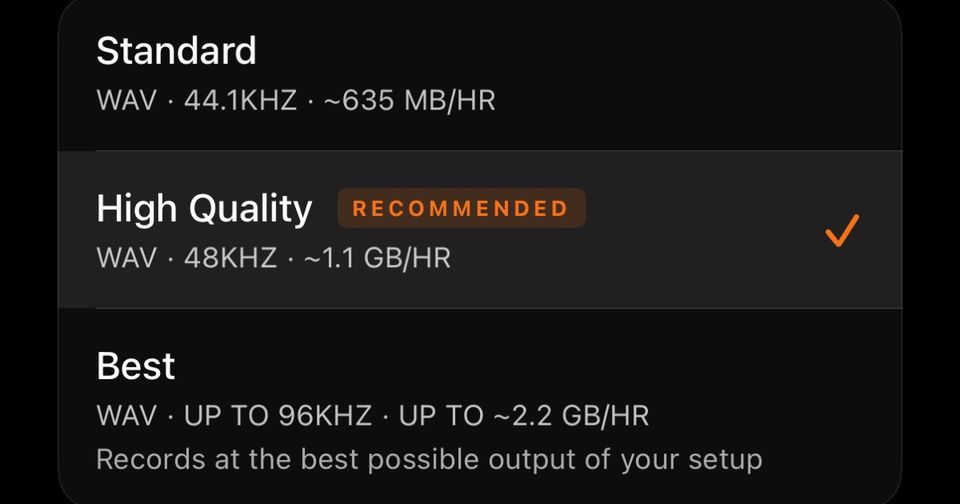
A two-hour set recorded at Ohm's Standard setting takes about 1.27 GB. Record the same set at Best on an interface that runs 96 kHz, and it takes about 4.15 GB. The DJ recording sample rate you choose before you press Record decides which of those numbers your phone has to find room for, and Ohm's recording quality settings are where that choice lives.
A set is one long WAV file. There is no fixing this afterwards. Ohm gives you three formats in Settings > Recording Format, shown as three cards. This guide covers what each one records, what it costs in storage, and how to choose.
The three formats at a glance
All three write uncompressed WAV (integer PCM). Bit depth is fixed by the format. Sample rate is a request, which matters for Best, and we come to that below.
- Standard: 44.1 kHz, 16-bit, 635 MB per hour calculated (card label: about 635 MB/hr).
- High Quality (default, marked Recommended): 48 kHz, 24-bit, 1.04 GB per hour calculated (card label: about 1.1 GB/hr).
- Best: up to 96 kHz, 24-bit, 2.07 GB at 96 kHz per hour calculated (card label: up to about 2.2 GB/hr).
The calculated figures are sample rate x channels x bytes per sample, for stereo, in decimal gigabytes (the unit iOS uses for phone storage). The card labels are the app's own rounded figures and sit about 6% above the calculated ones. Plan against the calculated numbers and you will have a small cushion either way.
What sample rate and bit depth change
Sample rate is how many times per second the audio is measured, and it is the number people mean when they ask about DJ recording sample rate. Bit depth is how finely each measurement is recorded. Both feed straight into file size, and file size is the part we can state with certainty. Standard, at 16-bit, gives the smaller file. The two 24-bit formats carry more headroom and a lower noise floor than 16-bit, which is worth having if you plan to master the set later.
We are not going to tell you that 96 kHz sounds better than 48 kHz. Whether you can hear it depends on your monitors, your room and the source material. Gigabytes, on the other hand, you can count.
What Best actually does
The Best card says it records "at the best possible output of your setup", with "up to 96" on its face. That wording is literal.
Ohm asks iOS for 96 kHz. iOS agrees a rate with whatever is plugged in, and Ohm writes the file at the rate the session reports when recording starts. If your interface runs at 96 kHz, you get a 96 kHz, 24-bit file. If it tops out lower, the file is written at the lower rate, still 24-bit.
For a 48 kHz-limited interface, that points to a 48 kHz, 24-bit file, the same size per hour as High Quality. We have inferred that from how the recorder works, not tested it on a range of hardware, so check a short test recording before you rely on it. We know of no on-screen readout of the rate it ended up with.
Our guide to USB audio interfaces for recording covers what to look for in hardware. Check your own interface's specification before assuming 96 kHz.
USB or internal microphone
The two input paths differ in more than rate.
USB: stereo, 24-bit at High Quality and Best, up to 96 kHz at Best. If you plug in a mixer, Ohm records post-fader audio over USB and the figures above apply as written.
Internal microphone: mono, one channel. The same bit depths apply, so a mic recording is about half the size of the stereo figures for the same rate. A 48 kHz, 24-bit mono file comes to roughly 0.52 GB per hour. Mic files typically land at 48 kHz, but the rate is negotiated like any other, so don't treat 48 kHz as guaranteed.
Working out storage for your set
The arithmetic is short. Take the calculated per-hour figure and multiply by the length of your set.
- Standard: 0.64 GB for one hour, 1.27 GB for two.
- High Quality: 1.04 GB, then 2.07 GB.
- Best at 96 kHz costs 2.07 GB for the first hour and 4.15 GB once you reach two.
Headers and metadata add kilobytes. They don't move the totals. Ohm writes the mix title and your cue points into the WAV after you stop.
We have left out longer Best examples on purpose. A standard WAV file has a size limit of about 4.29 GB, which at 96 kHz, 24-bit stereo arrives after roughly 2.07 hours. We have not confirmed how Ohm handles playback, upload or cue points beyond that size, so we are not going to suggest a 4-hour Best set is safe.
Check your free space in iOS Settings > General > iPhone Storage before a long night. Ohm's own Settings screen does not show it. Our pre-recording checklist puts that check where it belongs.
Which one to pick
Start from High Quality. It is the default: 24-bit at 48 kHz, a little over 1 GB an hour.
- High Quality for most sets. Stay here unless you have a specific reason to move.
- Standard when space is tight, or when the set is going to a platform that will flatten it anyway. Two hours costs 1.27 GB.
- Best when your interface runs at 96 kHz and you have the room. Confirm it with a test file rather than assuming.
Not sure your interface reaches 96 kHz? Then High Quality costs you nothing. Best on a 48 kHz-limited interface should give you the same file at the same size.
What happens when you upload
Format choice and upload are separate steps. SoundCloud receives the WAV as recorded. Mixcloud receives an AAC transcode at 128, 256 or 320 kbps (default 320), 44.1 kHz stereo, whatever format you recorded in. A Best recording sent to Mixcloud is downsampled on the way.
One label to watch: the setting is still called MP3 Quality, but the encoder is AAC. We have not yet verified either upload against a live account, so read this as how the app is built to behave.
Record for the archive you want to keep, not for the platform. If the WAV on your phone is the master, the format you picked is the ceiling for everything made from it. Pick it before the first track, because there is no second take of a night.